Custom CRM

Custom CRM systems for leads, clients, jobs and follow-up.

Just Call Dan builds practical CRM systems and business software for teams that need a clearer way to manage enquiries, clients, jobs, tasks, reminders, files and reporting.

CRM design

Built around the way your business already works.

A good CRM should match your actual process, not force your team into software that was designed for someone else. Dan can map your enquiry, sales, client and job flow into a practical system.

  • Lead pipelines and enquiry tracking
  • Client records, notes, files and history
  • Job status, task lists and reminders
  • Owner, admin, sales and staff views

Automation

Follow-up and handover without the loose ends.

Custom CRM work can include automations for follow-ups, handovers, review requests, client updates, reminders and reporting.

  • Website form to CRM workflows
  • Email and task automations
  • Review and client update prompts
  • Role-based dashboards and permissions

Portals

Give clients and staff the right information in the right place.

Client portals and staff workspaces can reduce back-and-forth by giving people a clear place to see status, submit details, upload files and complete tasks.

  • Client portals and secure forms
  • Staff dashboards and job queues
  • Document and file collection
  • Reporting views for owners and managers

Proof

See the work in context.

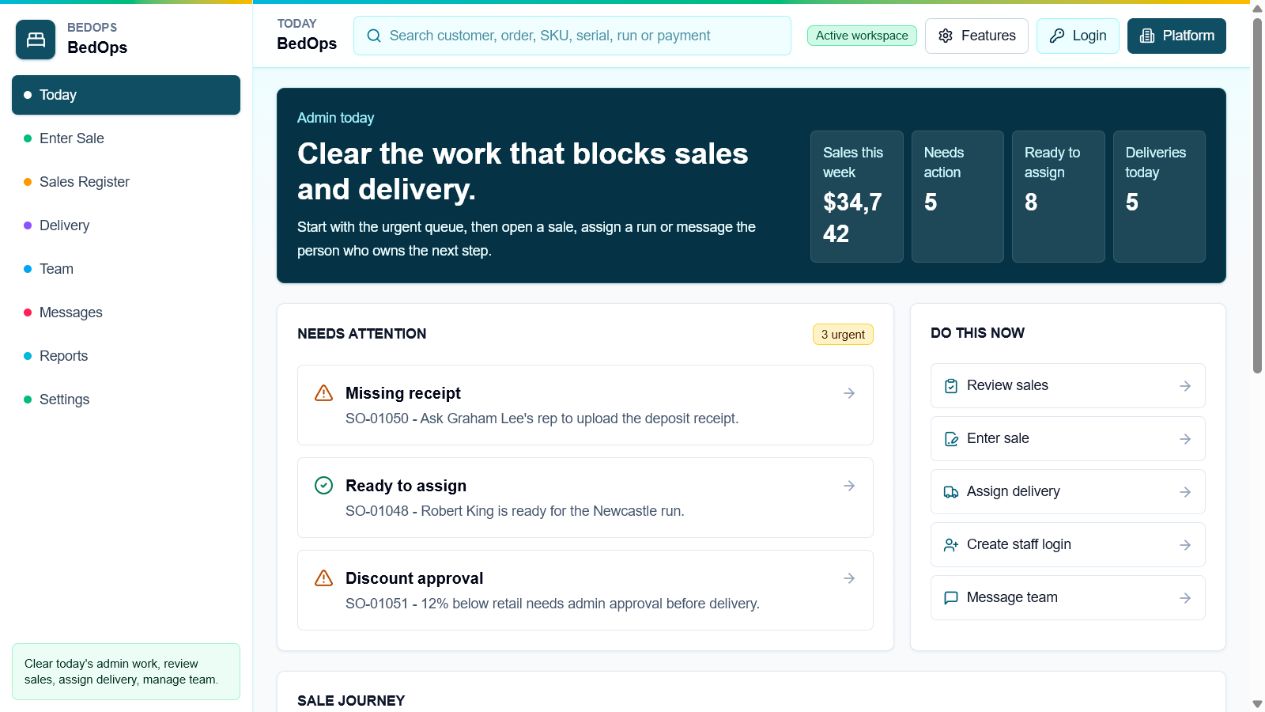
BedOps screenshot

Custom CRM + operations demo

BedOps

Admin, sales rep and driver workspaces with delivery workflows, reports, permissions and role-based dashboards.View example
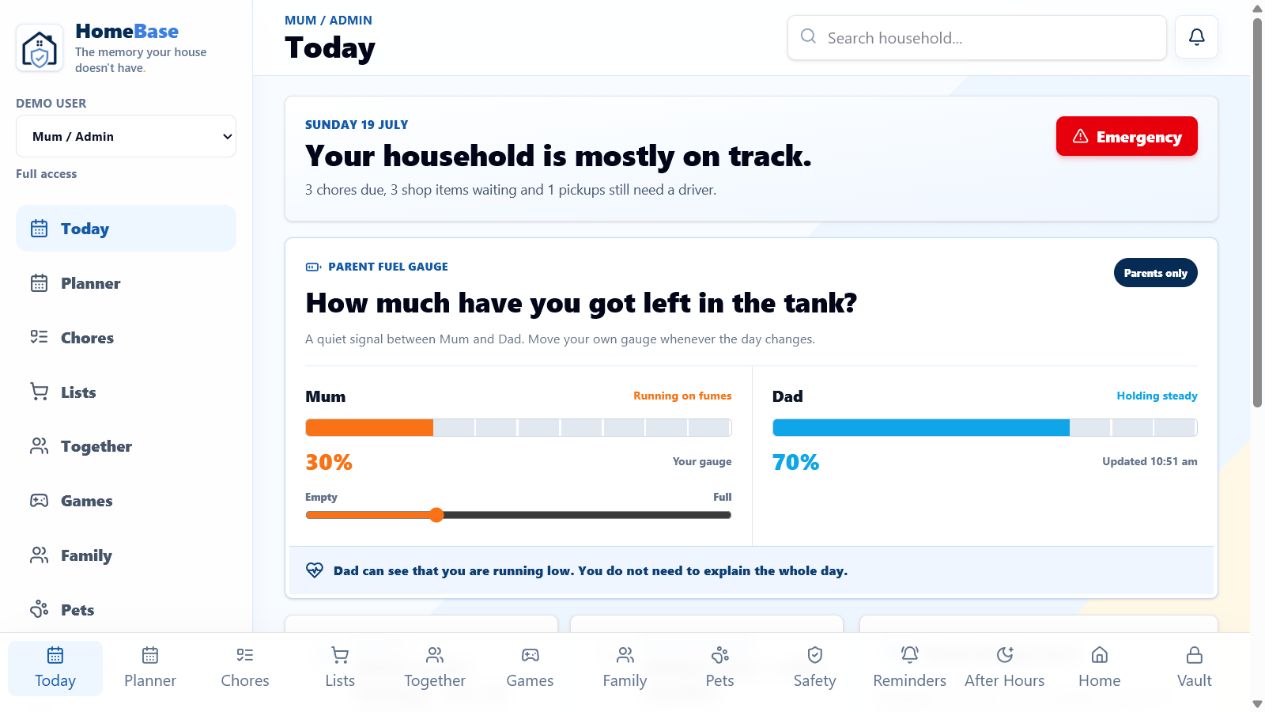
HomeBase screenshot

SaaS product demo

HomeBase

A logged-in product dashboard showing accounts, workflows, shared data and a customer-facing software experience.View example

Questions

What people usually ask first.

Do I need off-the-shelf CRM software first?

No. If your process is specific, a custom CRM can be built around how your business already handles leads, clients and jobs.

Can it connect to my website?

Yes. Website forms can feed the CRM, create tasks, trigger follow-ups and give you cleaner enquiry visibility.

Can different users see different things?

Yes. A custom CRM can include admin, staff, sales, driver, client or manager views with different permissions.

CRM use cases

A custom CRM should remove the repeated admin that slows down enquiries and jobs.

The best CRM is shaped around the way the business already works: how leads arrive, who follows up, what information is needed, when jobs move forward and what the owner needs to see at a glance.

Lead and quote pipelines

Capture website enquiries, assign follow-up, track quote status, set reminders and stop warm leads from disappearing into email threads.

Job and client tracking

Keep client records, notes, files, job status, tasks, next actions and history in one place so staff do not need to chase scattered updates.

Dashboards and portals

Owner dashboards, staff workspaces, sales views, driver views, client portals and permission-based screens for the people who need different information.

Where custom beats off-the-shelf

If the process is specific, off-the-shelf software often creates workarounds. Custom CRM work is useful when the sales process, job flow, approvals or reporting need to match the business closely.

  • Website form to CRM automation
  • Follow-up reminders and email triggers
  • Client records, files, notes and job history
  • Role-based views for owners, staff and customers

Software proof

For CRM work, working demos are stronger than vague claims.

Custom CRM projects can feel risky because they are invisible until they work. That is why the page leans on real demo systems, clear use cases and a small first step: mapping the workflow before building too much.

Workflow proof

Map before building

Start with how leads, jobs, clients, files and follow-up move now, then decide what the CRM actually needs.

Demo proof

Open BedOps and HomeBase

See role-based dashboards, operations screens, customer-facing app thinking and working software patterns.

Scope proof

Build one useful part first

A lead tracker, job board, reminder system or client record can prove value before a larger CRM is built.

Good first CRM modules

  • Website enquiry to lead pipeline
  • Quote follow-up reminders
  • Client notes, files and job status
  • Owner dashboard for current work

Risk reducers

  • Plain-English workflow map
  • Simple first version
  • Role-based permissions
  • Exportable business data where practical

Start the conversation

Map the Custom CRM workflow first.

Start with the lead, job or client process that is currently hardest to manage.